



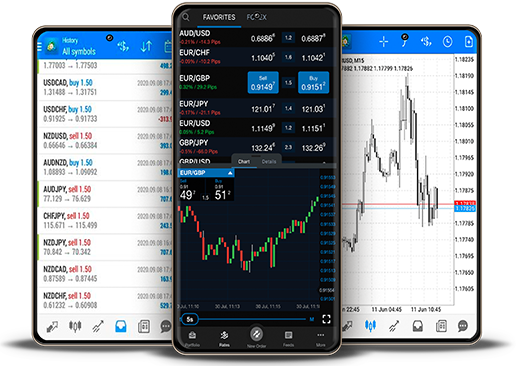







If you are using MetaTrader 4 (MT4) or MetaTrader 5 (MT5), one of the first panels you will notice on the platform is called the Market Watch window. Many beginners ignore this section in the beginning and focus only on charts. However, professional traders understand that Market Watch is the control center of the entire trading platform.
Whether you trade forex, gold, oil, indices, stocks, or cryptocurrencies, Market Watch helps you monitor real-time prices, check spreads, open charts quickly, and execute trades efficiently. In this complete guide, we will explain everything in simple and easy language so both beginners and advanced traders can understand its importance.
What is Market Watch?
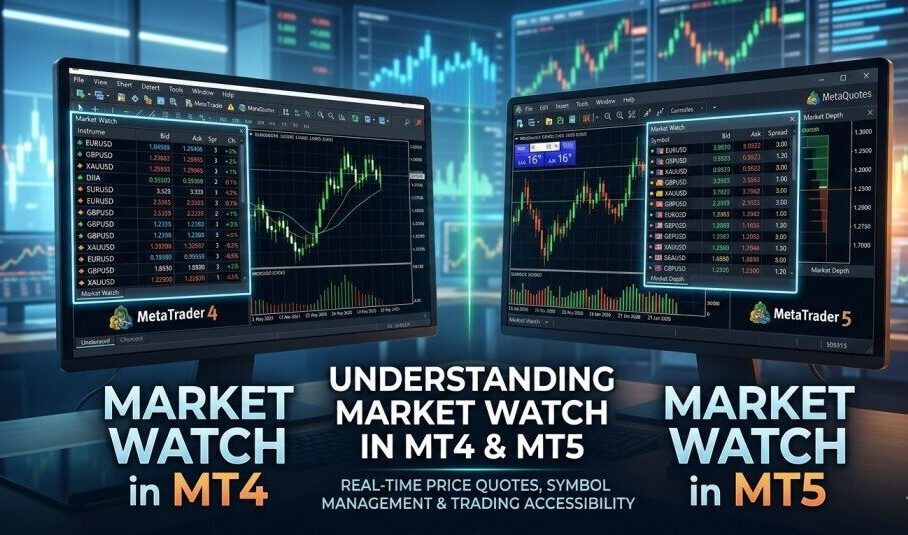
Market Watch is a window inside MT4 and MT5 that displays all available trading instruments provided by your broker. These instruments may include:
• Major currency pairs like EUR/USD, GBP/USD, USD/JPY
• Gold (XAU/USD)
• Silver (XAG/USD)
• Oil (WTI, Brent)
• Stock indices (NASDAQ, S&P 500, Dow Jones)
• Cryptocurrencies (BTC/USD, ETH/USD)
• Individual stocks (depending on broker)
In simple words, Market Watch is a live price board that shows what is happening in the market right now.
What Information Does Market Watch Show?
1. Symbol Name
Each trading instrument is listed by its symbol name.
2. Bid Price
The price at which the market is ready to buy from you.
3. Ask Price
The price at which the market is ready to sell to you.
4. Spread
The difference between Bid and Ask. This is the trading cost charged by your broker.
5. Last Update Time (in some setups)
Shows when the price was last updated.
Example:
If EUR/USD Bid is 1.1000 and Ask is 1.1002, the spread is 2 pips.
Understanding spread is very important because lower spread means lower trading cost.
Where to Find Market Watch?
Market Watch is usually located on the left side of the MT4 or MT5 platform.
If it is not visible:
• Press Ctrl + M
• Or go to View → Market Watch
This shortcut works in both MT4 and MT5.
How to Use Market Watch – Step by Step
1. Monitor Live Prices
Market Watch shows real-time price movement. This helps traders:
• Track volatility
• Compare spreads
• Identify active markets
• Choose the best trading opportunities
For example, if gold is moving very fast during news time, you can quickly notice it from Market Watch.
2. Add or Hide Trading Instruments
Sometimes brokers provide hundreds of instruments, but only a few are visible.
To manage symbols:
• Right-click inside Market Watch
• Click “Symbols”
• Select the instruments you want
• Click Show or Hide
Keeping only selected instruments improves focus and trading efficiency.
3. Open Charts Quickly
To open a chart:
• Right-click on any symbol
• Click “Chart Window”
The chart will open instantly. This is much faster than searching manually.
4. Place Trades Directly
You can place trades directly from Market Watch:
• Double-click on a symbol to open order window
• Or enable One-Click Trading
This feature is especially useful for scalpers who need fast execution.
5. Symbol Specification
Right-click a symbol and choose “Specification.”
This shows:
• Contract size
• Minimum lot size
• Maximum lot size
• Swap rates
• Margin requirements
• Trading hours
Checking specification is important for proper risk management.
Advanced Features in Market Watch
Depth of Market (DOM) – Mostly in MT5
MT5 offers Depth of Market feature which shows liquidity levels and pending orders. This is useful for:
• Scalpers
• Stock traders
• Futures traders
MT4 usually does not have full DOM unless provided by broker plugin.
Spread Monitoring Strategy
Professional traders monitor spreads before entering trades. During major news events, spreads can increase significantly. Market Watch allows you to compare spreads instantly between instruments.
MT4 vs MT5 Market Watch Differences
Interface:
MT4 has a simpler layout.
MT5 offers a more modern interface.
Asset Support:
MT4 focuses mainly on forex and CFDs.
MT5 supports forex, stocks, futures, and more.
Depth of Market:
Limited in MT4.
Built-in in MT5.
Performance:
MT5 handles multiple instruments more smoothly.
Why Market Watch is Important for Traders
1. Faster Decision Making
Instead of opening multiple charts, you can monitor everything from one panel.
2. Better Risk Control
By checking spreads and specifications, you avoid unexpected costs.
3. Efficient Market Scanning
You can quickly see which instrument is moving and which one is quiet.
4. Quick Trade Execution
Especially useful during high volatility or news trading.
Example for Beginners
A beginner opens MT4 and sees EUR/USD spread is 1 pip while Gold spread is 25 pips. The trader chooses EUR/USD because it is cheaper to trade. From Market Watch, the trader opens the chart and places a trade.
Example for Professional Traders
A professional trader:
• Keeps 8–10 selected instruments
• Monitors spreads before London session
• Uses Depth of Market in MT5
• Executes trades within seconds
For them, Market Watch acts like a trading dashboard.
Common Mistakes Traders Make
• Ignoring spread before trading
• Not checking contract size
• Showing too many instruments
• Trading during widened spreads
• Ignoring market session timing
Pro Tips to Use Market Watch Effectively
• Keep only your favorite instruments
• Check spreads before entry
• Review contract specifications weekly
• Use MT5 for advanced analysis
• Monitor price changes during major sessions (London & New York)
• Combine Market Watch with economic calendar
Market Watch in Different Markets
Forex:
Monitor major, minor, and exotic pairs easily.
Gold & Commodities:
Track gold volatility and oil price movement.
Indices:
Observe global market performance in real time.
Crypto:
Monitor strong volatility and spread changes.
Is Market Watch Enough for Analysis?
No. Market Watch shows live prices but does not provide full technical analysis. You still need:
• Chart patterns
• Indicators
• Support & resistance
• Fundamental news analysis
Think of Market Watch as your monitoring tool, while charts are your analysis tools.
How Market Watch Improves Trading Psychology
When traders monitor spreads and price changes regularly, they become more disciplined. They avoid impulsive trades and wait for better opportunities. This improves long-term performance.
Final Conclusion
Market Watch in MT4 and MT5 is more than just a price list. It is your trading command center. It allows you to:
• Monitor live prices
• Compare spreads
• Open charts instantly
• Execute trades quickly
• Manage instruments efficiently
• Access symbol specifications
• Use Depth of Market in MT5
Whether you are a beginner learning forex trading or an experienced trader managing multiple assets, mastering Market Watch can significantly improve your trading speed, efficiency, and confidence.
If you truly want to become a professional trader, start using Market Watch strategically instead of ignoring it.


3 Comments
Marvin McKinney
March 26, 2024Sed ut perspiciatis unde omnis iste natus error sit voluptatem accusantium doloremque laudantium, illo inventore veritatis dicta sunt explicabo.
McKiney
March 26, 2024Sed ut perspiciatis unde omnis iste natus error sit voluptatem accusantium doloremque laudantium, illo inventore veritatis dicta sunt explicabo.
Brooklyn Simmons
March 26, 2024Sed ut perspiciatis unde omnis iste natus error sit voluptatem accusantium doloremque laudantium, illo inventore veritatis dicta sunt explicabo.